Iron Fuel App & Partner Rewards

Maximize Your Iron Fuel Card’s Benefits!
Once you receive and activate your card, start earning rewards and taking advantage of all the benefits of the fuel program.
Connect your card to each of our partners’ rewards programs to earn more rewards including free showers, drinks, parking, and more!
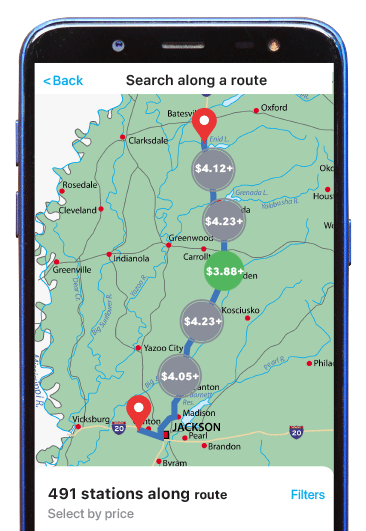
Find the best fuel prices along your route
Once your fuel card is activated, DOWNLOAD THE EFS WEX CARD CONTROL APP to help you locate the best price for fuel in the Iron Fuel Network.
Find fuel quickly along a route by entering your starting and ending destinations along with up to 3 additional stops.
Download the EFS WEX Card Control APP


Our Reward Partners
Earn additional rewards by signing up for your favorite stops’ rewards programs and download their apps. Use your Iron Fuel card with our rewards partners’ programs to earn rewards including free showers, drinks, parking, additional fuel discounts, and more.

-
- Pick up a My Loves Reward card at the diesel counter of a Love’s near you
- Register your My Loves Rewards card through the app or at the Loves counter
- Download the Love’s Connect app and sign in with your rewards number
- Connect your fuel card by going to “Wallet” in the Loves myReward app
a. Choose EFS as the card type
b. Select EFS Fleet as your card
c. Enter your card information - Start fueling and earning rewards
- Answer the prompts at the pump.
- Enter your rewards number or swipe your rewards card when prompted.
- Start fueling!
- Free shower with 50+ gallon fill-up
- Free drink with 50+ gallon fill-up
- In-store discounts
Learn how the gallons you pump this month determine your rewards for the next month.
- Setup the Rewards App
-
-
- Pick up a My Loves Reward card at the diesel counter of a Love’s near you
- Register your My Loves Rewards card through the app or at the Loves counter
- Download the Love’s Connect app and sign in with your rewards number
- Connect your fuel card by going to “Wallet” in the Loves myReward app
a. Choose EFS as the card type
b. Select EFS Fleet as your card
c. Enter your card information - Start fueling and earning rewards
-
- Start Earning Reward Points
-
- Answer the prompts at the pump.
- Enter your rewards number or swipe your rewards card when prompted.
- Start fueling!
- Love's Rewards
-
- Free shower with 50+ gallon fill-up
- Free drink with 50+ gallon fill-up
- In-store discounts
Learn how the gallons you pump this month determine your rewards for the next month.


-
- Download the app: myRewards Plus.
- Login or signup for an account
- Scroll down to wallet and click “Manage Payment Cards”
- Click Add New Card payment and type in your card number
- Enter other information as prompted by the app
- Step by step: Pilot Flying J, Page 5
- Download the app: myRewards Plus.
- At the pump, open your app and click “Start mobile fueling”
- Select your Iron EFS fuel card.
- Answer the prompts in the app (about the type of fuel, confirm your card, and if you plan on buying products in the store)
- Enter the code at the pump and start fueling.
Step by step mobile fueling pg 6
- Free Shower after 50+ gallon fill
- Additional Fuel Discounts
- Food and drinks
- Parking
- Free Meal on your birthday
- Daily and weekly offers
- The gallons you pump this month determine your status and points for the next month. Learn more about Pilot Flying J Rewards, Pilot FLying J Points
- Setup the Rewards App
-
-
- Download the app: myRewards Plus.
- Login or signup for an account
- Scroll down to wallet and click “Manage Payment Cards”
- Click Add New Card payment and type in your card number
- Enter other information as prompted by the app
- Step by step: Pilot Flying J, Page 5
- Download the app: myRewards Plus.
-
- Start Earning Reward Points
-
- At the pump, open your app and click “Start mobile fueling”
- Select your Iron EFS fuel card.
- Answer the prompts in the app (about the type of fuel, confirm your card, and if you plan on buying products in the store)
- Enter the code at the pump and start fueling.
Step by step mobile fueling pg 6
- Pilot Flying J Rewards
-
- Free Shower after 50+ gallon fill
- Additional Fuel Discounts
- Food and drinks
- Parking
- Free Meal on your birthday
- Daily and weekly offers
- The gallons you pump this month determine your status and points for the next month. Learn more about Pilot Flying J Rewards, Pilot FLying J Points

- Download the app: TruckSmart
- Create an account or login
- Choose EFS as your card type and EFS as your card. Add your Iron card information.
- The first time you use your card at the pump, follow the prompts in the app
- Start fueling and earning rewards!
- When you’re at the pump, open the TruckSmart App
- Choose the PumpSmart feature
- Select the fleet commercial payment option
- Enter the code it gives you at the pump
- Start fueling
- Showers
- In-store merchandise
- Meals
- Reserved parking
- Free wifi
Learn how the gallons you pump this month determine your rewards and your points for the next month.
Learn more about TA Petro Fuel Rewards
- Setup the Rewards App
-
- Download the app: TruckSmart
- Create an account or login
- Choose EFS as your card type and EFS as your card. Add your Iron card information.
- The first time you use your card at the pump, follow the prompts in the app
- Start fueling and earning rewards!
- Download the app: TruckSmart
- Start Earning Reward Points
-
- When you’re at the pump, open the TruckSmart App
- Choose the PumpSmart feature
- Select the fleet commercial payment option
- Enter the code it gives you at the pump
- Start fueling
- TA Petro Rewards
-
- Showers
- In-store merchandise
- Meals
- Reserved parking
- Free wifi
Learn how the gallons you pump this month determine your rewards and your points for the next month.
Learn more about TA Petro Fuel Rewards
- Download the Speedway Fuel and Speedy Rewards app
- Sign up for an account or login
- Answer the prompts at the pump.
- Use rewards number or your app to get rewards for the fill-up
- Pay with your Iron Fuel card
- Additional fuel discounts
- Free drinks
- Free food
- Monthly perks and in-app coupons
Learn more about Speedy Rewards.
- Setup the Rewards App
-
- Download the Speedway Fuel and Speedy Rewards app
- Sign up for an account or login
- Download the Speedway Fuel and Speedy Rewards app
- Start Earning Reward Points
-
- Answer the prompts at the pump.
- Use rewards number or your app to get rewards for the fill-up
- Pay with your Iron Fuel card
- Speedway Rewards
-
- Additional fuel discounts
- Free drinks
- Free food
- Monthly perks and in-app coupons
Learn more about Speedy Rewards.
Set Up an Account
- Download the Casey’s app
- Create an account by choosing “Join Now” in the app or on their website.
a. Fill out the form
b. Choose “Create an Account.”
Add Your Card to the App
 .
.
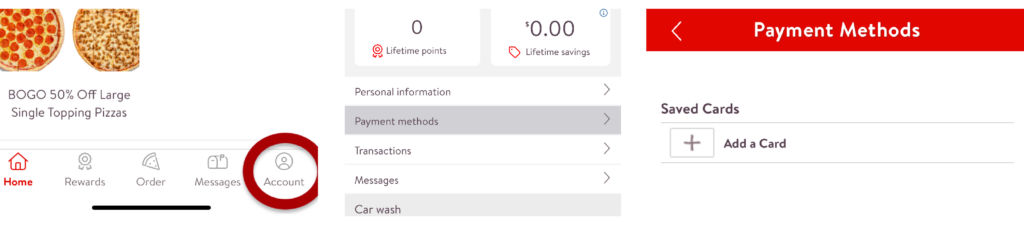
- Choose “Account” from the menu options at the bottom of the app
- Choose Payment Methods
- Select “Add a Card”
- Enter your card information and select “Save Card”
Earn Points on All Purchases
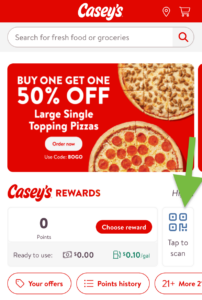
To earn points:
- Show your Barcode at Checkout
- Or Enter your phone number at the pump
What Reward You Can Earn
- Casey’s cash to spend in a Casey’s store
- Cash for Classrooms: turn your points into school donations
Learn more about Casey’s Rewards.
- Setup the Rewards App
-
Set Up an Account
- Download the Casey’s app
- Create an account by choosing “Join Now” in the app or on their website.
a. Fill out the form
b. Choose “Create an Account.”
Add Your Card to the App
.- Choose “Account” from the menu options at the bottom of the app
- Choose Payment Methods
- Select “Add a Card”
- Enter your card information and select “Save Card”
- Download the Casey’s app
- Start Earning Reward Points
-
Earn Points on All Purchases
To earn points:
- Show your Barcode at Checkout
- Or Enter your phone number at the pump
- Casey's Rewards
-
What Reward You Can Earn
- Casey’s cash to spend in a Casey’s store
- Cash for Classrooms: turn your points into school donations
Learn more about Casey’s Rewards.

Set Up AMBest Rewards
Register your card online:
-
- Go to their Online Registration
- Choose “Register Card Now”
- Enter your information as prompted, using your Iron Fuel Card for the card number
Downloading the app isn’t necessary but you can it to access registration and additional information about the program.
To Earn Points:
Use your card at the pump or inside, your points will automatically be added.
Rewards You Can Earn
- Earn one point for every gallon, but the more you fuel, the more points you’ll earn.
- Points can be redeemed for in-store purchases like food and drinks.
- Earn a free shower with every 75 gallons of fuel purchased.
Learn more about AMBest Rewards
- Setup the Rewards App
-
Set Up AMBest Rewards
Register your card online:
-
- Go to their Online Registration
- Choose “Register Card Now”
- Enter your information as prompted, using your Iron Fuel Card for the card number
Downloading the app isn’t necessary but you can it to access registration and additional information about the program.
-
- Start Earning Reward Points
-
To Earn Points:
Use your card at the pump or inside, your points will automatically be added.
- AMBest Rewards
-
Rewards You Can Earn
- Earn one point for every gallon, but the more you fuel, the more points you’ll earn.
- Points can be redeemed for in-store purchases like food and drinks.
- Earn a free shower with every 75 gallons of fuel purchased.
Learn more about AMBest Rewards